A Visual Studio Code theme inspired by the clean, warm, and focused interface of Claude AI.
This theme is designed for those who appreciate a calm, minimalist, and readable environment. It uses a warm, off-white background and a carefully selected palette for syntax highlighting to reduce eye strain and improve code comprehension.
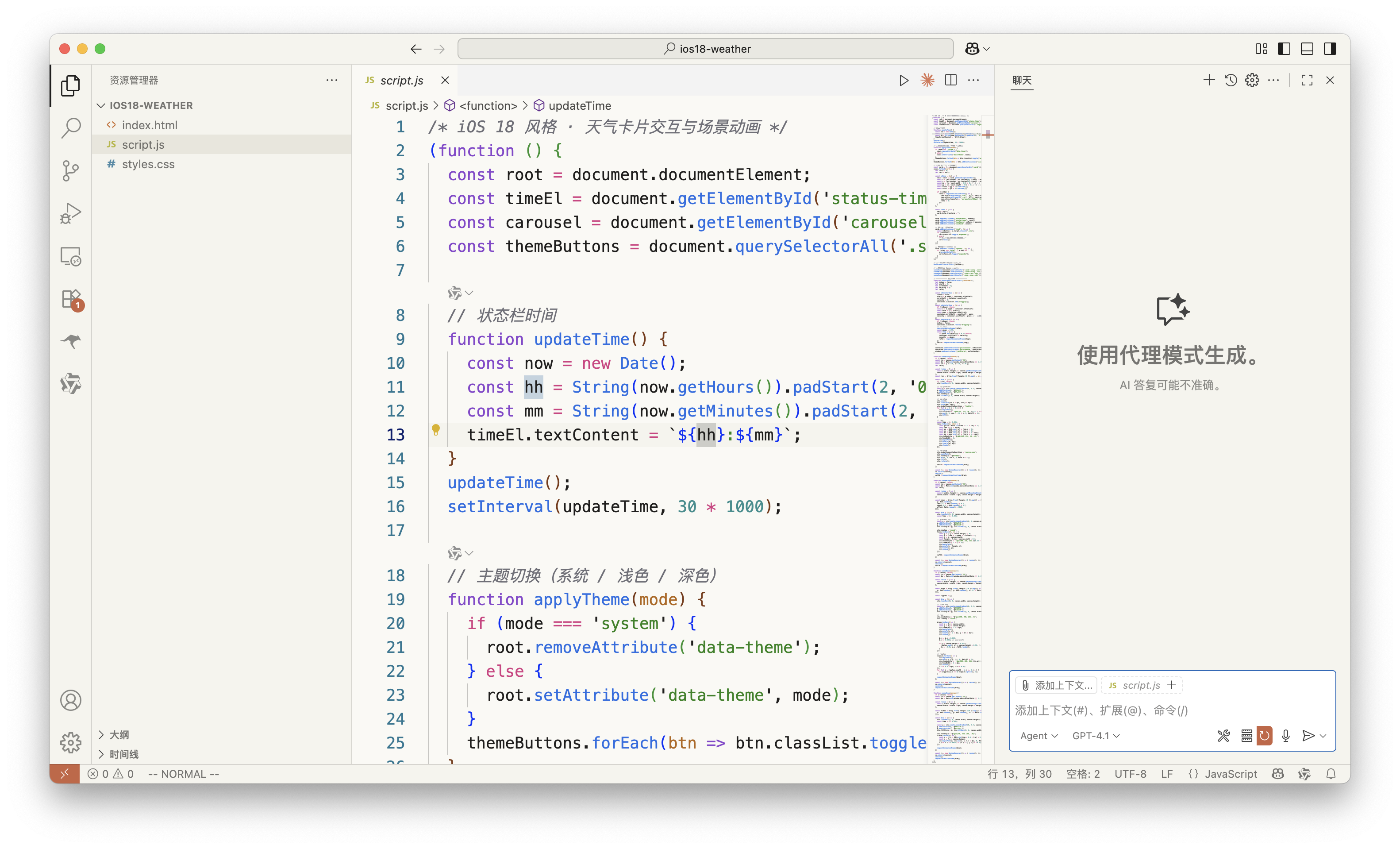
- Warm & Focused UI: A gentle, paper-like background (
#FAF9F5) that's easy on the eyes during long coding sessions. - Enhanced HTML/CSS Support: Comprehensive syntax highlighting for web development with proper color-coding for tags, attributes, properties, and values.
- Harmonious Highlighting: Syntax colors are carefully tuned to be clear and aesthetically pleasing, inspired by Claude's official palette.
- Consistent Design: Provides a cohesive look and feel across the entire VS Code workbench, from the editor to the terminal.
- Clarity First: The color scheme prioritizes readability and semantic meaning, helping you understand your code at a glance.
- Background:
#FAF9F5(Warm Off-White) - Foreground:
#1F1E1D(Dark Brown-Gray) - Accent:
#1C6BBB(Claude Blue) - Emphasis:
#C96442(Terracotta Orange)
- Keywords:
#D73A83(Pink) - Types & Classes:
#8A46CE(Purple) - Functions:
#1F6FE4(Blue) - Numbers & Constants:
#2D8F8F(Cyan) - Parameters:
#B56613(Orange-Brown) - Strings:
#26831A(Green) - Comments:
#6F6F78(Gray)
- HTML Tags:
#D73A83(Pink) - HTML Attributes:
#1F6FE4(Blue) - HTML Values:
#26831A(Green) - CSS Properties:
#B56613(Orange-Brown) - CSS Values:
#2D8F8F(Cyan) - CSS Selectors:
#8A46CE(Purple)
- Open the Extensions sidebar in VS Code (
Ctrl+Shift+XorCmd+Shift+X). - Search for
clioc claude theme. - Click Install.
- Open the Command Palette (
Ctrl+Shift+PorCmd+Shift+P), typePreferences: Color Theme, and select clioc claude theme.
- Download the latest
.vsixfile from the releases page. - Open the Extensions sidebar in VS Code.
- Click the ... menu in the top-right corner, select Install from VSIX..., and choose the downloaded file.
You can override the theme's colors in your personal settings.json file.
Contributions are welcome! If you find any issues or have suggestions for improvements, please feel free to open an issue or submit a pull request.
This theme is licensed under the MIT License.
{
  "workbench.colorCustomizations": {
    "[clioc claude theme]": {
      "editor.background": "#FAFAFA", // Make it a bit whiter
      "activityBar.background": "#F5F3EE"
    }
  },
  "editor.tokenColorCustomizations": {
    "[clioc claude theme]": {
      "comments": "#888888", // Make comments a bit lighter
      "strings": "#008000"  // A different shade of green for strings
    }
  }
}